Delete Your Account & Data
Applies to the Kaambuddy Customer and Kaambuddy Partner apps, operated by Thinkyantra Solution Private Limited.
Last updated: 30 September 2026
1. Delete from inside the app
- Open the Kaambuddy Customer or Kaambuddy Partner app and log in.
- Go to the Profile tab.
- Scroll down and tap Delete Account.
- Confirm by tapping Delete Account in the dialog.
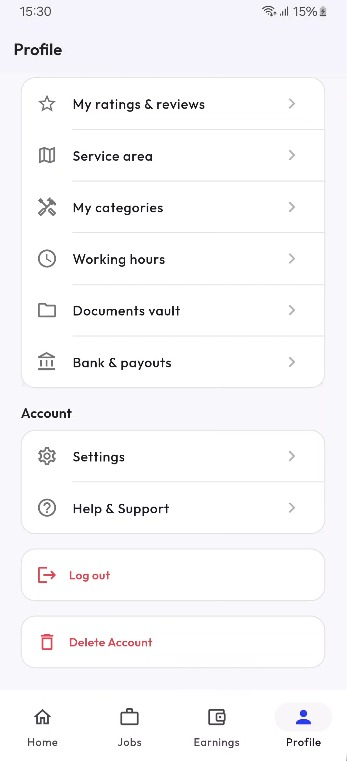
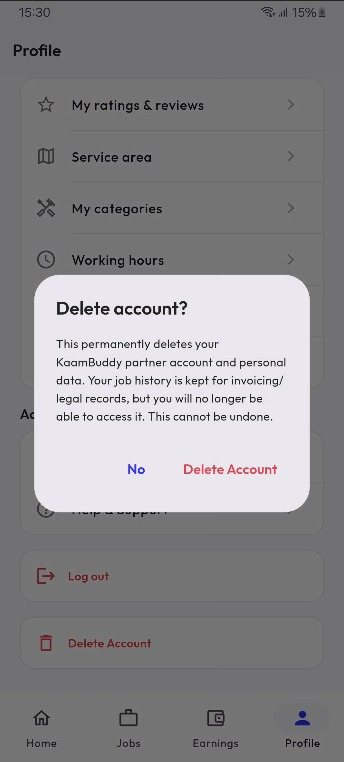
Your account is deleted immediately and you are logged out. This cannot be undone.
2. Request deletion without the app
If you can't access the app, email us at hello@thinkyantra.com with the subject "Account Deletion Request" from your registered email, or message us on WhatsApp. Please include your registered mobile number and whether it is a Customer or Partner account. We may ask you to verify ownership before deleting.
3. Data that is deleted
- Profile details such as name, phone number, email and photo
- Location, service area and saved addresses
- Partner details such as categories, working hours, uploaded documents and bank/payout details
- Ratings, reviews and other content linked to your profile
4. Data that is retained
Job/booking history and transaction records may be kept where required for invoicing, tax, legal, fraud-prevention or dispute purposes, for as long as required by applicable law. This retained data is no longer accessible to you or shown publicly.
5. Timeline
In-app deletions take effect immediately. Requests sent by email or WhatsApp are processed within 30 days.